How to be on the Front Page and in the Daily Email
Article ID: 39 | Last Updated: Wed, Jul 3, 2019 at 12:40 AM
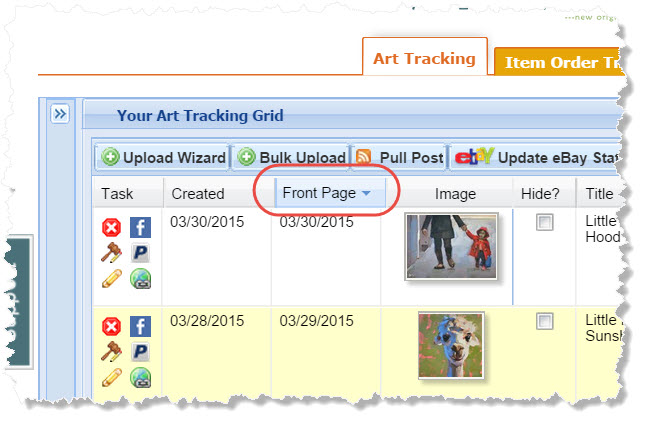
Your artwork in DPW can receive additional exposure by appearing on our What's New front page and in our Daily Email, which goes out to over 5,000 subscribers a day. It is the Front Page date for the work, set in either the Upload Wizard or in your Art Tracking grid that determines on which date your work will appear.
For example, if you want to be on the front page and in the email tomorrow, then be sure one of your paintings has tomorrow as the Front Page date. The Front Page date is automatically set by DPW, but can be changed, as you will see below, in your Art Tracking grid.
Important: A given work can be on the front page and in the daily email up to three times, however not more often than once every six months. Also, only one painting per artist can be on the front page and in the daily email at a time. So, if you have more than one painting with the same Front Page date, only one will be published. It is usually the first one posted for the day, but this is not guaranteed. So, the best strategy is to spread out your artwork's Front Page dates into the future, one artwork per day.
The Art on the Front Page Rotates Upward Every 15 Minutes
When you are on the front page, you will get your day in the sun, up at the top, just under the featured artists. The art rotates upward every 15 minutes, making a full rotation every nine hours.
Viewing/Setting your Front Page Dates
 Print Article
 Export to PDF
 Export to MS Word